
What’s on My Dashboard?
A workspace of converters, calculators, clocks and notes that you arrange yourself.
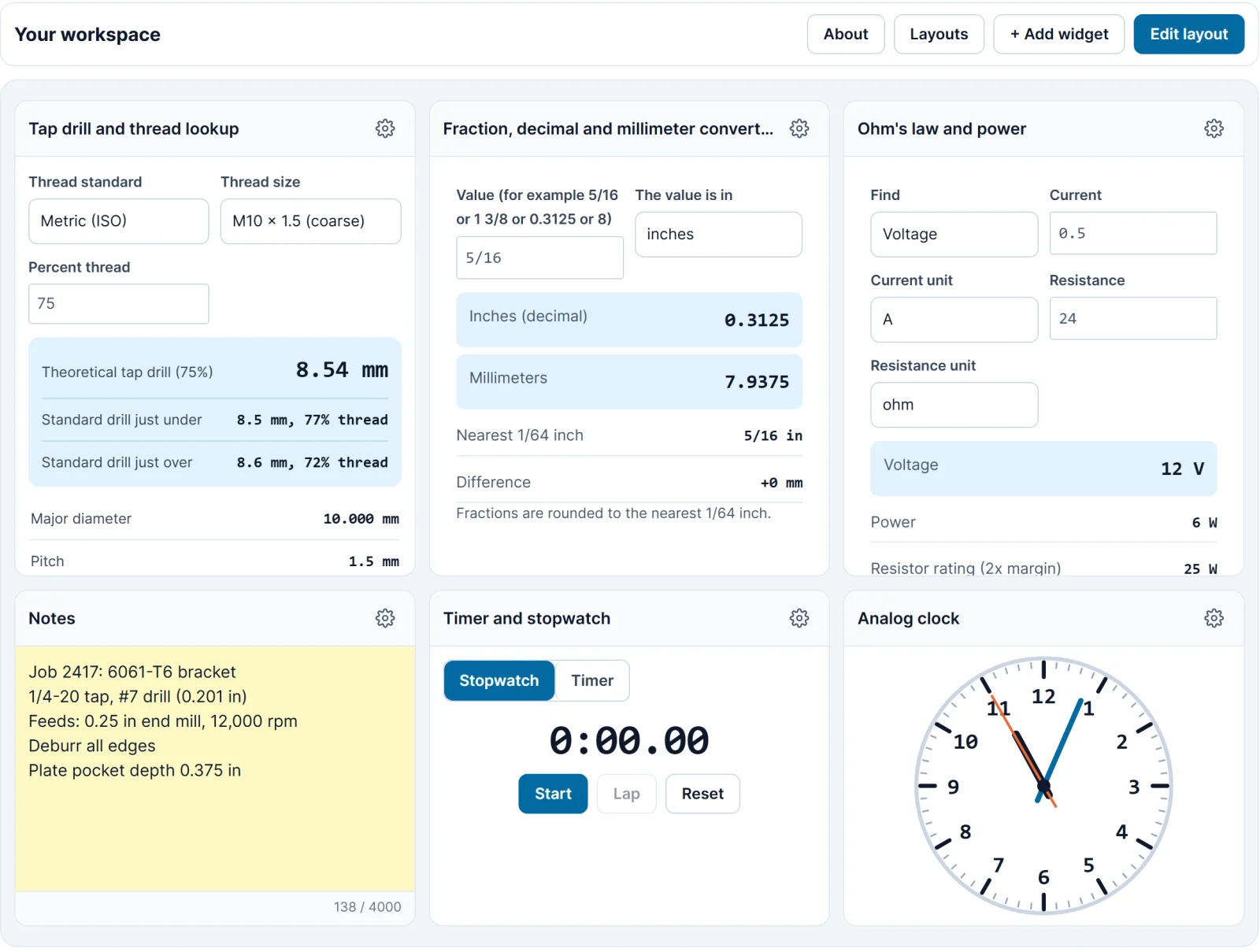
My Dashboard is a workspace of your own: a grid of small tools you choose and arrange, saved to your account and waiting for you on every computer you log in from. It currently offers 160 widgets, from unit converters and calculators to clocks, notes, wire sizing and thread lookups. Drag a widget to move it, pull a corner to resize it, and add as many as you like.
The preview needs no account: use the widgets, add more with Add widget, and rearrange them with Edit layout. Nothing is saved in the preview. Members keep their workspace, their notes and each widget’s settings. Members with the no-ads plan also get a wide layout that uses the full width of a large monitor, and the standard layout is saved separately so nothing breaks if a plan changes.
What it looks like
Start from a set
Not sure where to begin? Open the preview with one of these starting sets, then change anything you like.
- Mechanical: length, force and torque converters, section properties, a clock and notes.
- Electrical: Ohm’s law, wire size, resistor color code, a voltage divider, 4–20 mA scaling and notes.
- Machining: feeds and speeds, tap drills, a drill bit finder, a fraction converter and a timer.
- Student: a calculator, a quick converter, a to-do list, a study timer, a clock and notes.
- FE exam: a calculator, quick converter, constants, a study timer, an exam countdown and notes.
- Controls: the PID tuner, 4–20 mA scaling, a CRC calculator, a subnet calculator, a to-do list and notes.
- HVAC and thermal: psychrometrics, dew point, air density, pipe flow, the weather and notes.
- Robotics: motor torque and inertia, a gear designer, the PID tuner, a calculator, a timer and notes.
- 3D printing: the tolerance guide, fractions, a quick converter, a timer, a to-do list and notes.
The wide layout
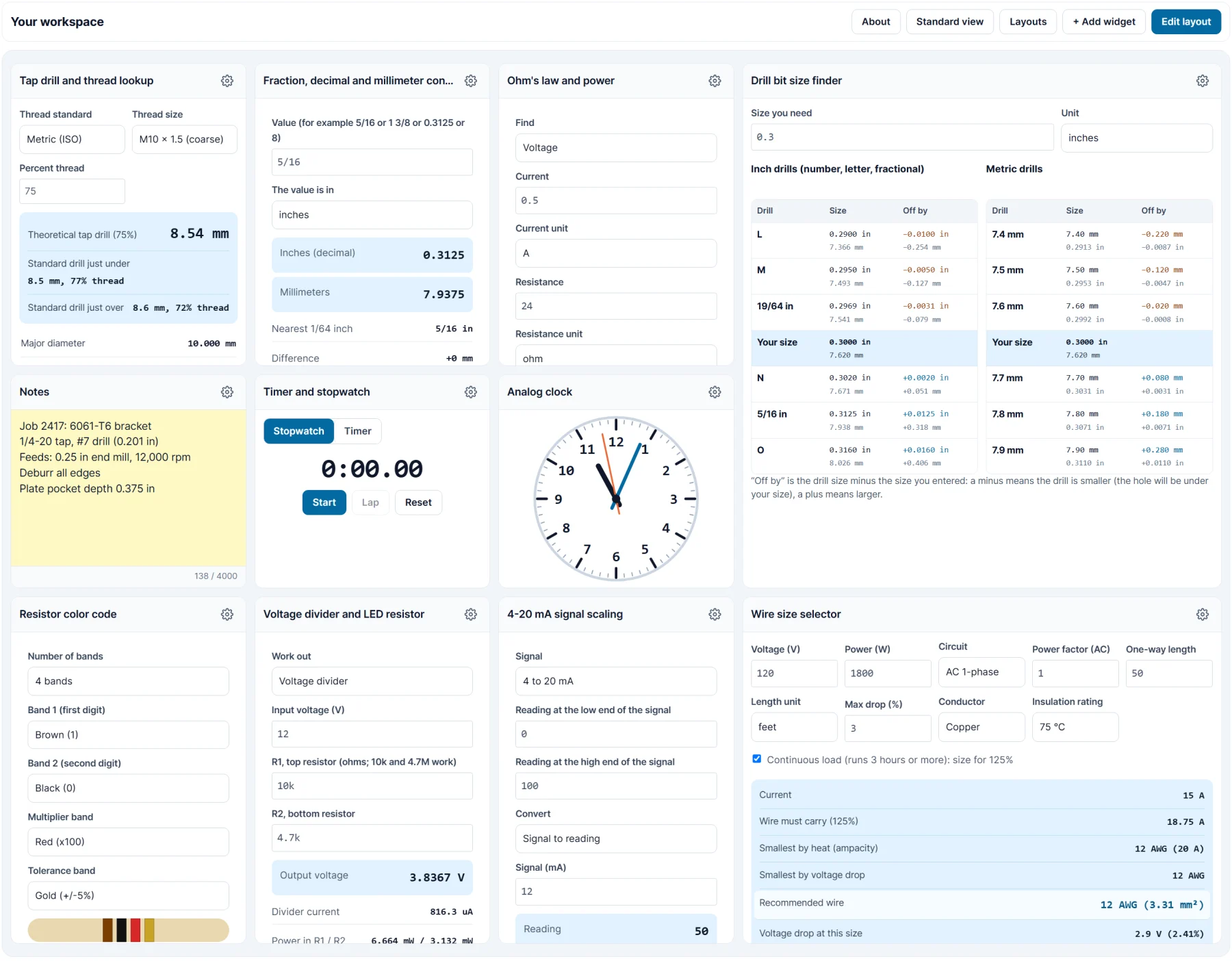
Members with the no-ads plan also get a full-width layout on a large monitor: 20 columns instead of 12, so there is room for far more widgets at once. It is saved separately from the standard layout.
Every widget
Widgets marked Works in the free preview can be tried without an account. The rest use data saved to your account or larger reference tables, so they need a membership.
Clocks and time (7)
Analog clock
A classic clock face for any time zone.
Works in the free previewDigital clock
Time and date in 12 or 24 hour format, any time zone.
Works in the free previewTimer and stopwatch
A stopwatch with laps, and a countdown timer with an alarm.
Works in the free previewWorld clocks
Up to six time zones in one tile, with the day difference from your own.
Works in the free previewDate calculator
Days and working days between two dates, or a date plus a number of days. Shows the week number and day of the year.
Works in the free previewCountdown to a date
Days left until a date you name: a design review, a ship date, an exam.
Works in the free previewFocus timer (Pomodoro)
Work and break periods that follow each other, with a count of the focus periods you finished today.
Works in the free previewWeather and air (4)
Weather
Current conditions and a 3-day outlook for the place you choose.
Works in the free previewBarometric pressure and density altitude
From an altimeter setting, temperature and dew point: station pressure, pressure altitude, density altitude and air density.
Works in the free previewSunrise, sunset and daylight
Sunrise, sunset and day length for the place you choose, today and tomorrow.
Works in the free previewAir quality and UV
The US air quality index, fine particles, ozone and the UV index for the place you choose.
Works in the free previewNotes (4)
Notes
A plain text notepad that is saved with your layout. Web addresses become links. Add as many as you like, and pick a background color in each one's settings.
Works in the free previewTo-do checklist
A tick-off list that is saved with your layout. Add as many lists as you like.
Works in the free previewTeam checklist
A tick-off list shared with a group. Anyone in the group can add, tick or remove tasks and everyone sees the change within a few seconds. Make or join a group with an invite code.
Works in the free previewTeam notepad
A notepad shared with a group. Edits show up for everyone within a few seconds; if two people edit at once you are asked which text to keep.
Works in the free previewCalculators (9)
Calculator
A basic, scientific or programmer (hex, binary, bitwise) calculator. Choose the type in the widget settings; you can add one of each. The programmer type needs a tall widget (about 11 rows).
Works in the free previewSlope, grade and pitch
Enter a rise and a run and see the slope as percent grade, degrees, a ratio and a roof pitch (x in 12).
Works in the free previewWater properties lookup
Density, specific heat, viscosity and vapor pressure of liquid water at a temperature from 0 to 100 C.
Works in the free previewSection properties
Area, moment of inertia, section modulus and radius of gyration of a rectangle, round bar, tube or I section.
Works in the free previewQuick conversion
Type a value with its unit, such as 3.5 in or 40 psi, and see it in every related unit at once.
Works in the free previewCurrency converter
Convert between 30 currencies with the European Central Bank reference rates, updated each working day.
Members onlyUnit scratchpad
Type sums with units, such as 5 ft + 3 in to mm, or 2 kg * 9.81, and get the answer in the unit you ask for.
Works in the free previewTriangle solver
A right triangle from any two known values, or an oblique triangle from three known values (SSS, SAS or ASA), with the area.
Works in the free previewQuick math: decibels, percent, rounding
Decibel and ratio conversion, percent of, percent change, and rounding to significant figures.
Works in the free previewFull calculators (63)
Every calculator under Tools that can be embedded also works as a widget: the same calculator as its page, with its formulas, checks and worked example, inside your workspace.
- 3D Printing Tolerancing Guide
- 555 Timer Calculator
- Air Density Calculator
- Baseboard and Trim Calculator
- Battery Runtime and Pack Calculator
- Beam Calculator with Diagrams and Section Properties
- Bearing Life (L10) Calculator
- Bitwise & Register Field Calculator
- Compressed Air Consumption Calculator
- Compression Spring Design Calculator
- Concrete Calculator
- Conduction, Convection and Radiation Heat Transfer Calculator
- Conduit Fill Calculator
- Dew Point Calculator
- Drywall Calculator
- Euler Buckling Calculator (Critical Load of a Column)
- Fence Post and Materials Calculator
- Fillet Weld Size and Strength Calculator
- Fit Calculator (ISO 286)
- Free Fall Calculator
- Gear Ratio, Torque & Speed Generator
- Gravel Calculator
- Heat Sink and Thermal Resistance Calculator
- Horsepower, Torque and RPM Calculator
- Lathe Turning Calculator
- Linear Interpolation Calculator
- LM317 Adjustable Regulator Calculator
- MCU Pinout & Peripheral Multiplexer
- Metal Removal Rate Calculator
- Motor Torque & Inertia Matching Calculator
- Mulch Calculator
- Natural Frequency Calculator
- Orifice Plate Flow Calculator (ISO 5167)
- Paint Calculator
- PCB Trace Width & Current Calculator
- PID Tuner
- Pipe Flow and Pressure Drop Calculator
- Pipe Volume Calculator
- Pneumatic and Hydraulic Cylinder Force and Speed Calculator
- Process Capability Calculator
- Projectile Motion Calculator
- Psychrometric Calculator and Chart
- Pump Power and Sizing Calculator
- RC Time Constant and Filter Calculator
- Reactance and Resonance Calculator
- Resistor Network and Standard Value Calculator
- Reynolds Number Calculator
- Roof Pitch Calculator
- SFM to RPM Calculator
- Shaft and Key Sizing Calculator
- Sheet-Metal Bend Allowance Calculator
- Sine Bar Calculator
- Spur Gear Pair Designer
- Square Footage Calculator
- Stair and Ramp Calculator
- Steel and Plate Weight Calculator
- Tank Volume Calculator
- Thermal Expansion Calculator
- Threaded Insert and Fastener Calculator
- Three-Phase Power and Power Factor Calculator
- Tolerance Stack-up Calculator
- Truss Solver (Method of Joints)
- Wire Ampacity and Voltage Drop Calculator
Electrical (7)
Wire size selector
Choose a wire gauge (AWG) from the voltage and power, with the run length so voltage drop is checked too.
Works in the free previewOhm's law and power
Find voltage, current or resistance from the other two, with the power in watts and the resistor wattage to use.
Works in the free previewResistor color code
Pick the color bands of a 4 or 5 band resistor and read its value and tolerance.
Works in the free preview4-20 mA signal scaling
Turn a 4-20 mA, 0-10 V or similar signal into engineering units, or the other way round.
Works in the free previewVoltage divider and LED resistor
The output of a two-resistor divider, or the series resistor for an LED with the nearest standard value.
Works in the free previewMotor full-load current
Three-phase motor full-load amps by horsepower at 208, 230, 460 and 575 V.
Members onlyThermocouple lookup
Type K and type J: millivolts to temperature or temperature to millivolts, with cold-junction compensation.
Works in the free previewShop and fabrication (11)
Drill bit size finder
Enter a size in inches or mm and see the three nearest inch and metric drill bits below and above it, and how far off each one is.
Works in the free previewTap drill and thread lookup
Metric and inch threads: the tap drill size, the nearest standard drills with their percent thread, and the thread dimensions.
Works in the free previewFraction, decimal and millimeter converter
Type an inch fraction (5/16), a decimal inch or a millimeter value and see all three, plus the nearest 1/64 inch fraction.
Works in the free previewPipe size and pressure lookup
Steel pipe sizes (NPS 1/2 to 12, schedule 40 and 80): diameters, wall, weight, water volume and the Barlow pressure rating.
Works in the free previewBolt torque lookup
Metric coarse bolts M5 to M36 in classes 8.8, 10.9 and 12.9: preload and tightening torque, dry and lubricated.
Members onlySpeeds and feeds quick card
Pick a material and an end mill size and read a starting spindle speed and feed rate.
Works in the free previewSheet metal gauge lookup
A gauge number as thickness for steel, galvanized steel, stainless steel and aluminum sheet.
Members onlyO-ring and keyway lookup
O-ring cross-sections with groove depths, and standard key and keyway sizes by shaft diameter (metric and inch).
Members onlyHardness converter
Rockwell C, Vickers and Brinell hardness of steel with the approximate tensile strength.
Members onlyBolt circle and hole pattern
X and Y coordinates of evenly spaced holes on a circle, with the angle step and the distance between holes.
Works in the free previewCost per part
Material, machine time, setup and overhead for a quantity of parts: unit cost, total cost and a selling price with markup.
Works in the free previewProgramming and data (6)
Text encoding converter
ASCII text, hex, binary, decimal byte values and Base64. Type in any box and the others follow.
Works in the free previewASCII table
All 128 ASCII codes with decimal, hex and binary values, and a search box.
Members onlyUnix time converter
A Unix timestamp as a date and time, or a date and time as a timestamp.
Works in the free previewIP subnet lookup
From an address and prefix such as 192.168.1.10/24: network, mask, broadcast, host range and host count.
Works in the free previewCRC and checksum
CRC-16 (Modbus, CCITT, XMODEM), CRC-32 and simple checksums of text or hex bytes.
Works in the free previewRegular expression tester
Try a pattern against sample text and see every match and its groups.
Works in the free previewEngineering reference (8)
Steel shape lookup
Pick a W beam, S beam, channel or angle and read its weight, dimensions and section properties.
Members onlyFits and tolerances lookup
Enter a size and an ISO fit such as H7/g6 and read the hole and shaft limits and the clearance.
Members onlyMaterial quick lookup
Pick a material and see its density, stiffness, strength, thermal expansion and conductivity on one card.
Members onlyPhysical constants
The constants engineers reach for (g, R, standard atmosphere, Boltzmann and more) with a search box.
Members onlyCompare materials
Pick materials and the properties to compare in a table. Add or remove properties with the plus and minus, and drag a handle to reorder them. Uses the verified values from the Materials section.
Works in the free previewMaterial data sheet
Pick a material from the sourced library and see its key properties (density, stiffness, strength, thermal values) in SI or US units, with a link to the page with every source.
Works in the free previewPeriodic table
All 118 elements by group and period, with atomic number, atomic mass and, for the common engineering metals, density and melting point.
Works in the free previewStandards quick reference
Search ISO, ASME, ASTM, IEC, NFPA and other standard numbers by number or topic, and see what each one covers.
Works in the free previewStudy and exam prep (4)
Practice question of the day
One FE or PE practice question a day, from the problem banks. Pick your exam in the settings, answer, and see the worked solution. Your result counts in your practice progress.
Members onlyPractice progress
How many practice problems you have tried, your accuracy, your weakest topics and your latest scores for the exam you choose.
Members onlyGlossary lookup
Type a term and see its short definition, with a link to the page that explains it.
Works in the free previewFormula finder
Search the formulas on the Formulas page: type a name or a word such as bending, flow or torque, and open the page.
Works in the free previewProductivity (3)
Time log
Start and stop a timer for a job and keep a list of the time spent, with totals. Download the list as a CSV file.
Works in the free previewTask board
Three columns (To do, Doing, Done) with small cards you move across. Saved with your layout.
Works in the free previewDatasheet and part search
Type a part number and open a datasheet or supplier search in a new tab: Google, DigiKey, Mouser or Octopart.
Works in the free previewReference tables (1)
Material Properties
Density, stiffness and strength at room temperature.
Works in the free previewUnit converters (28)
Each converter works like its page under Unit Conversions: type in any box and every other unit follows.
- Pressure converter
- Density converter
- Temperature converter
- Angles converter
- Flow Rate converter
- Time converter
- Stress converter
- Strain converter
- Velocity converter
- Volume converter
- Length converter
- Mass converter
- Force converter
- Torque converter
- Power converter
- Energy converter
- Area converter
- Dynamic Viscosity converter
- Kinematic Viscosity converter
- Thermal Conductivity converter
- Heat Transfer Coefficient converter
- Specific Heat converter
- Heat Flux converter
- Acceleration converter
- Frequency and Rotation Speed converter
- Digital Storage converter
- Area Moment of Inertia converter
- Mass Moment of Inertia converter
Pictures (1)
Image
Show a picture of your own: a wiring diagram, a pinout, a drawing, a photo. Large images are shrunk automatically; limit 10 images.
Members onlyMy pages (4)
My bookmarks
Your bookmarked guides, tools and tables as a list of quick links. Use the Bookmark button on any page to add to it.
Works in the free previewQuick links
Buttons for your own web addresses: supplier portals, standards sites, your drawing system. Add them in the widget settings.
Works in the free previewMy saved calculations
Your latest saved calculator runs as quick links. Use Save calculation on any calculator to add to it.
Members onlyNew on Engineer Underground
The newest guides, tools and tables on the site.
Works in the free previewGood to know
- A member can keep up to 40 widgets on a workspace. Notes, converter choices and other settings are saved with the layout.
- Members can keep up to five workspaces, for example Work, School and Shop, each with its own widgets, wide layout and background color. Switch between them with the tabs above the toolbar.
- Click the main result of a calculator widget to type that number into your Calculator widget, or to copy it when there is no calculator on the workspace.
- On a phone the widgets stack in one column. Editing the layout is for tablets and computers.
- Press Ctrl+K (Cmd+K on a Mac) to search for a widget by name or topic. Members can also export a layout to a file and import it again, and print a workspace or save it as a PDF.
- Missing a widget you would use every day? Suggest one.
- Memberships and prices are on the account page.